Every organization operating online must navigate two critical responsibilities: respecting user data privacy and ensuring broad digital inclusion. When we build and maintain online platforms, cookie consent, website accessibility, and privacy regulations naturally overlap. A consent banner that blocks screen readers or prevents keyboard navigation fails both privacy and accessibility standards. In this guide, we break down how consent management and web accessibility work together, why your organization needs them, and how to implement solutions that protect user rights while remaining fully usable for everyone.

Key Takeaways
• Accessibility and Consent Are Linked: A cookie banner that cannot be operated by keyboard or screen reader users creates compliance risks and excludes potential customers.
• WCAG Standards Apply to Modals: Consent overlays, popups, and preference centers must meet Web Content Accessibility Guidelines, including visible focus, contrast, and reflow standards.
• Equal Choice Accessibility: Core choices such as accepting or rejecting non-essential cookies must be equally visible, understandable, and reachable for users with diverse abilities.
• End-to-End Implementation Requirements: Proper consent management requires clean document structure, screen reader announcements, focus management, and mobile responsiveness.
• Operational Risk Reduction: Aligning consent tools with global accessibility rules reduces legal exposure, improves trust, and protects search engine visibility.
Table of Contents
• Understanding Consent Management and Website Accessibility Basics
• Why Your Organization Needs Accessible Consent Management
• How Accessible Cookie Consent Works Under the Hood
• Technical Integration and Implementation Workflows
• Frequently Asked Questions About Cookie Consent and Accessibility
• Sources and References
Understanding Consent Management and Website Accessibility Basics
To build effective digital experiences, we must understand both consent management and website accessibility as core operational building blocks rather than superficial design add-ons.
Defining Cookie Consent in Modern Digital Operations
Consent management is the systematic process of informing visitors about data collection and obtaining their permission before triggering tracking scripts, analytics, or advertising cookies. Under privacy frameworks such as the General Data Protection Regulation (GDPR) in Europe, the California Consumer Privacy Act (CCPA), and the Protection of Personal Information Act (POPIA) in South Africa, organizations must offer clear choices regarding personal data processing.
When a user arrives at a site, a consent management system presents an interface, typically a banner, modal, or floating panel, that lists tracking categories. These categories usually include essential cookies required for site performance, analytics cookies, functional cookies, and targeting or marketing cookies. A compliant consent tool ensures no non-essential scripts execute until the user actively gives permission.
Defining Website Accessibility and Core WCAG Standards
Website accessibility means designing web applications and platforms so that people with disabilities, including visual, auditory, motor, and cognitive impairments, can perceive, understand, navigate, and interact with them effectively. The global technical baseline for web accessibility is the Web Content Accessibility Guidelines (WCAG).
Published by the World Wide Web Consortium (W3C), the guideline defines the WCAG success criteria most directly relevant to cookie banners and consent controls across four main principles: Perceivable, Operable, Understandable, and Robust (POUR). When we evaluate interactive components, these standard criteria dictate how buttons, toggles, text contrast, and document focus behave.
The Intersection of Privacy Rules and Inclusive Design
Privacy laws require that consent be freely given, specific, informed, and unambiguous. However, if a consent banner is structurally invisible to screen reader software, or if a user who relies on switch access devices cannot reach the "Reject All" button, that consent cannot be considered legally valid or ethically sound.
When accessibility is neglected in privacy design, organizations inadvertently create digital barriers. An inaccessible cookie dialog can block the entire interface, rendering underlying page content unreachable for assistive technology users. By merging inclusive design with privacy practices, we ensure that every visitor retains control over their personal data regardless of how they navigate the web.
Compliance Aspect | Cookie Consent Focus | Website Accessibility Focus | Integrated Operational Objective |
|---|---|---|---|
Primary Goal | Obtain lawful permission for tracking and data processing | Ensure equal access and usability for users with disabilities | Provide an inclusive, transparent choice mechanism for all visitors |
Core Audience | All website visitors, privacy regulators | Assistive technology users, individuals with visual/motor/cognitive needs | The entire digital audience across all device types |
Key Standards | GDPR, CCPA/CPRA, POPIA, ePrivacy Directive | WCAG 2.1 / 2.2 (Level AA), EN 301 549, ADA | Unified compliance aligning privacy mandates with WCAG Level AA |
Interface Scope | Banners, preference centers, opt-out toggles, policy links | Full document structure, interactive controls, media, forms | Accessible banners, trap-free dialogs, and clear preference panels |
Failure Consequence | Regulatory fines, data protection enforcement actions | Accessibility lawsuits, brand erosion, poor user experience | Double regulatory risk, broken user journeys, loss of customer trust |
Why Your Organization Needs Accessible Consent Management
Deploying accessible consent tools is not just a theoretical preference; it directly impacts operational stability, brand reputation, legal risk management, and customer acquisition.
Meeting Legal Obligations Across Global Markets
Organizations operating globally face overlapping privacy laws and digital accessibility mandates. In the European Union, the European Accessibility Act (EAA) and EN 301 549 standards reinforce requirements for accessible digital services alongside the GDPR. In the United States, Title III of the Americans with Disabilities Act (ADA) is regularly applied to public web interfaces.
If your organization offers digital commerce, customer support, or online scheduling, such as a modern Booking and appointment website, failing to make consent components accessible exposes your business to enforcement actions from both data protection authorities and accessibility regulators.
Improving User Experience and Brand Perception
When consent banners are designed cleanly and navigate logically, overall user satisfaction increases. Complex popups with low contrast text, tiny touch targets, or obscure close buttons frustrate all users, not just those with disabilities.
Transparent, readable, and easy-to-use consent controls demonstrate respect for user autonomy. Organizations that prioritize accessible design cultivate stronger customer trust, leading to lower bounce rates and higher engagement across essential online services.
Mitigating Compliance Risks and Legal Exposure
Non-compliant consent implementations create vulnerabilities that plaintiffs' attorneys and privacy regulators quickly spot. Automated scanning tools frequently flag cookie banners for common technical failures, including:
• Low contrast ratio between button text and backgrounds.
• Interactive elements missing descriptive text labels.
• Focus traps that prevent keyboard users from exiting consent panels.
• Overlays hiding active focus indicators on underlying pages.
• Cookie preference toggles that do not announce their state (on/off) to assistive tools.
Addressing these specific vulnerabilities protects your organization from costly litigation and administrative penalties while ensuring continuous operational availability across all broader Website services.
How Accessible Cookie Consent Works Under the Hood
Building an accessible consent experience requires precise engineering. Below, we break down the exact technical mechanisms that make a cookie consent flow operable for everyone.
Keyboard Navigation and Focus Management Mechanics
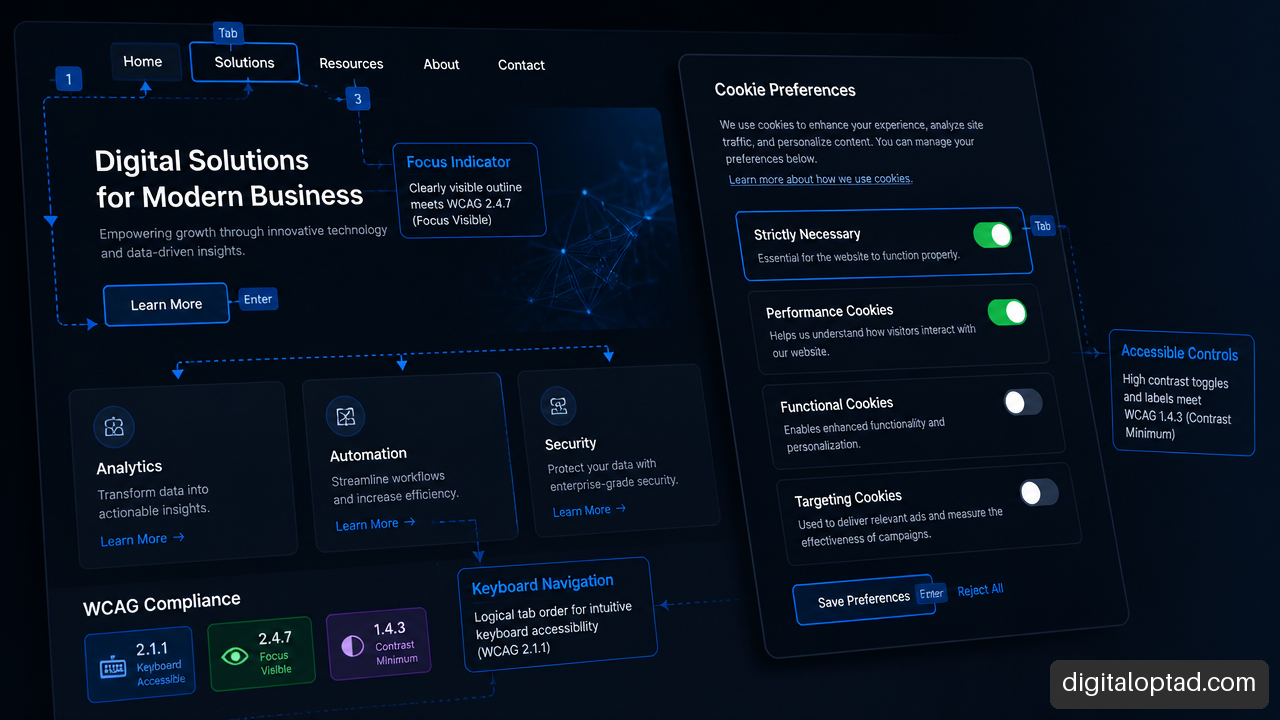
Keyboard accessibility is foundational to digital inclusion. Users with physical disabilities, visual impairments, or motor control challenges often rely entirely on the Tab, Shift + Tab, Enter, Space, and Escape keys rather than a mouse.
When a cookie banner appears as a modal dialog, focus management must follow strict patterns. The W3C WAI-ARIA Authoring Practices defines how modal dialogs should handle focus entry, trapping, and return when popups open and close. Here is how the focus lifecycle operates during a user session:
-
Initial Trigger: The cookie banner renders in the DOM after page initialization.
-
Focus Shift: System focus automatically moves to the dialog panel or its primary action button (e.g., "Accept All" or "Manage Preferences").
-
Focus Trapping: As long as the modal remains open, pressing
Tabcycles focus strictly among elements within the dialog, preventing keyboard navigation from drifting behind the overlay. -
Inert Background: Content behind the active consent modal is marked with the
aria-hidden="true"orinertattribute so screen readers do not read background elements. -
Focus Restoration: Once the user saves their preferences or dismisses the modal, focus immediately returns to the triggering control or the top of the main document.
Screen Reader Announcements and ARIA Dialog Patterns
Screen readers rely on structural HTML semantics and Accessible Rich Internet Applications (ARIA) attributes to convey interface context to visually impaired users. Without correct semantic roles, a screen reader may announce a consent banner as unstructured text without informing the user that an interactive decision is required.
To ensure proper announcement, the container element must use role="dialog" or role="alertdialog", accompanied by aria-labelledby referencing the title element and aria-describedby referencing the main explanatory text.
Cookie & Privacy Preferences
We use essential and performance cookies to optimize site functionality. Review your options below to grant or withdraw consent.
Accept All Reject Non-Essential Customize Settings
When a screen reader user encounters this component, the software immediately announces: "Cookie & Privacy Preferences, dialog, We use essential and performance cookies..." This gives the user instant context and allows them to navigate directly to action buttons.
Contrast, Reflow, and Display Adaptability Across Devices
Visual presentation plays a key role in accessibility compliance. WCAG 2.1 / 2.2 Level AA guidelines mandate strict contrast ratios for text and user interface components:
• Standard Text: Must maintain a contrast ratio of at least 4.5:1 against its background.
• Large Text (18pt or 14pt bold): Must maintain a minimum contrast ratio of 3.0:1.
• Non-text UI Controls: Button borders, active focus rings, and toggle switches must reach a 3.0:1 contrast ratio against adjacent colors.
Furthermore, responsiveness under WCAG Success Criterion 1.4.10 (Reflow) dictates that consent banners must adapt to display sizes down to 320 CSS pixels wide without horizontal scrolling or text clipping. When users zoom their browser interface to 200% or 400%, the consent panel must automatically stack controls vertically so actionable buttons remain fully visible and clickable on high-density devices, mobile screens, or specialized promo sites like a dedicated Service advertisement website.
Technical Integration and Implementation Workflows
Integrating accessible consent management systems into an organization's tech stack requires systematically combining custom frontend codebase standards with specialized Consent Management Platforms (CMPs).
Integrating Consent Tools with Custom Development
Many organizations utilize commercial CMP scripts injected via tag management systems. While these tools simplify legal policy updates, injected scripts often introduce accessibility bugs, such as improper DOM ordering, late script rendering, or stripped focus indicators.
When integrating third-party consent tools or custom scripts into web applications built with frameworks like React, Vue.js, or standard PHP, engineering teams should follow a structured integration sequence:
-
Early DOM Injection: Ensure the banner DOM nodes render early in the document tree or are explicitly managed with dynamic focus calls upon initialization.
-
Script Blocking Hooks: Tie consent listeners directly to analytics loader scripts, ensuring blocking logic does not break keyboard focus.
-
Focus Override Prevention: Prevent CMP vendor stylesheets from resetting standard browser focus outlines (
outline: noneoroutline: 0). -
Event Management: Expose custom JavaScript events when the preference center opens or closes to safely pause and resume background media or modal traps.
Designing Accessible Preference Centers and Category Toggles
While initial banners contain simple buttons, detailed preference centers present complex interactive controls such as expandable category accordions, radio groups, and state toggles.
A common failure in preference centers is using custom visual toggles built purely with styled <div> or <span> tags that lack accessible state tracking. To make cookie toggles accessible:
• Use native <input type="checkbox"> elements styled cleanly with CSS.
• Ensure each toggle has a visible, programmatic label connected via for and id attributes.
• If using custom toggle controls, include role="switch" along with explicit aria-checked="true" or aria-checked="false" attributes.
• Never rely on color alone (e.g., green for on, gray for off) to indicate toggle state; include clear visual text indicators like "Enabled" / "Disabled".
Auditing, Manual Testing, and Maintenance Schedules
Ensuring ongoing compliance requires combining automated scanning tools with manual accessibility testing workflows. Automated auditing tools catch baseline contrast issues and missing ARIA markup, but they cannot verify whether a focus trap operates correctly or if a screen reader announcement makes logical sense.
We recommend establishing a quarterly testing routine following this step-by-step audit workflow:
-
Automated Structural Scan: Run automated tools (such as axe-core or Lighthouse) on pages hosting the consent banner to catch baseline HTML semantic errors.
-
Keyboard-Only Audit: Disconnect the mouse and navigate through the initial banner and preference center using only the keyboard (
Tab,Shift + Tab,Space,Enter,Escape). Verify that:
• The focus indicator is always clearly visible.
• Focus moves logically from item to item.
• Focus does not escape to the background page content while the modal is open.
• PressingEscapecloses optional preference dialogs. -
Screen Reader Verification: Test the consent flow using screen readers across common operating environments (e.g., NVDA or JAWS on Windows, VoiceOver on macOS/iOS, TalkBack on Android). Listen carefully to ensure:
• The banner title and explanation are read immediately upon opening.
• Toggle state changes ("checked" / "unchecked") are spoken clearly upon activation. -
Reflow & High-Zoom Check: Zoom browser viewports to 200% and test on small mobile screen dimensions to confirm text does not overlap or truncate.
Frequently Asked Questions About Cookie Consent and Accessibility
What makes a cookie consent banner accessible?
An accessible cookie consent banner is perceivable, operable, understandable, and robust for all users. Key technical requirements include full keyboard navigation, visible focus indicators, clear visual text contrast, proper ARIA attributes (role="dialog"), responsive reflow on mobile screens, and explicit labeling for screen reader users.
Does a cookie banner need to be keyboard accessible?
Yes. Under WCAG criteria (including Success Criterion 2.1.1 Keyboard), every interactive element, such as accept buttons, reject buttons, preference switches, and privacy policy links, must be completely operable using a standard keyboard without requiring precise mouse interactions.
How should a screen reader announce a cookie consent dialog?
When a cookie banner appears, screen readers should announce it as a distinct modal dialog. By applying role="dialog", aria-modal="true", and linking container headings via aria-labelledby, the screen reader immediately informs the user that a privacy consent panel has opened and reads its title and main text content automatically.
What WCAG criteria apply to cookie banners?
Key WCAG criteria applicable to consent banners include:
• 2.1.1 Keyboard: All controls operable via keyboard.
• 2.4.3 Focus Order: Logical navigation sequence through consent choices.
• 2.4.7 Focus Visible: Clear outline showing which button or switch is focused.
• 1.4.3 Contrast (Minimum): Sufficient visual contrast for text.
• 1.4.11 Non-text Contrast: Visual indicators for toggles and button borders.
• 1.4.10 Reflow: Clean display adaptation without loss of function at 200% zoom.
• 2.4.11 / 2.4.12 Focus Not Obscured: Ensuring popups do not cover focused elements on underlying pages.
How do we avoid focus traps in consent modals?
To manage focus correctly without creating problematic keyboard traps, the consent modal should keep focus constrained within its interactive controls while open, but release focus predictably once the user submits choices or closes the panel. Restoring focus directly to the initiating control or primary page header ensures the user can continue navigating smoothly.
Should "Accept all" and "Reject all" options be equally accessible?
Yes. From both privacy compliance and accessibility standpoints, rejecting non-essential cookies should be as simple and clear as accepting them. Hiding "Reject All" behind extra menus, using faint low-contrast text for opt-out choices, or making reject toggles harder to reach via keyboard creates deceptive design patterns (dark patterns) that violate data protection rules and lower usability.
What happens if a consent center fails mobile reflow?
If a consent center fails mobile reflow, text labels may become truncated, buttons can overlap, or critical controls like "Save Preferences" may be pushed offscreen. This prevents visitors from configuring privacy settings, breaches WCAG reflow guidelines, and disrupts the mobile user experience.
Sources and References
• W3C — Web Content Accessibility Guidelines (WCAG) 2.2: https://www.w3.org/TR/WCAG22/
• W3C WAI-ARIA Authoring Practices — Dialog (Modal) Pattern: https://www.w3.org/WAI/ARIA/apg/patterns/dialog-modal/